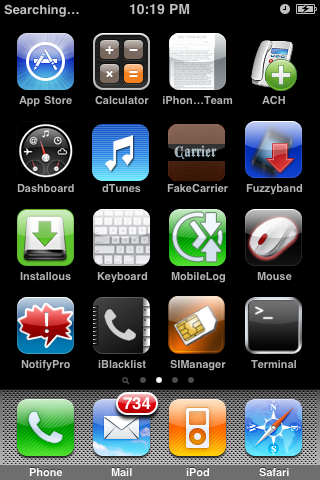
Gameloft Posts iPhone Trailer for Rayman 2: The Great Escape


Gameloft has posted an iPhone Trailer for Rayman 2: The Great Escape, a new game to be released in the App Store March 1st.

Coming on the App Store March 1st, 2010. Rayman, the world-famous video game icon, is back and ready for action! Relive all the enjoyment of Rayman 2: The Great Escape, the game that brought the armless hero into 3D environments for the first time!

Take a look below...


ADR Studio Posts iPhone 4G Concept Video

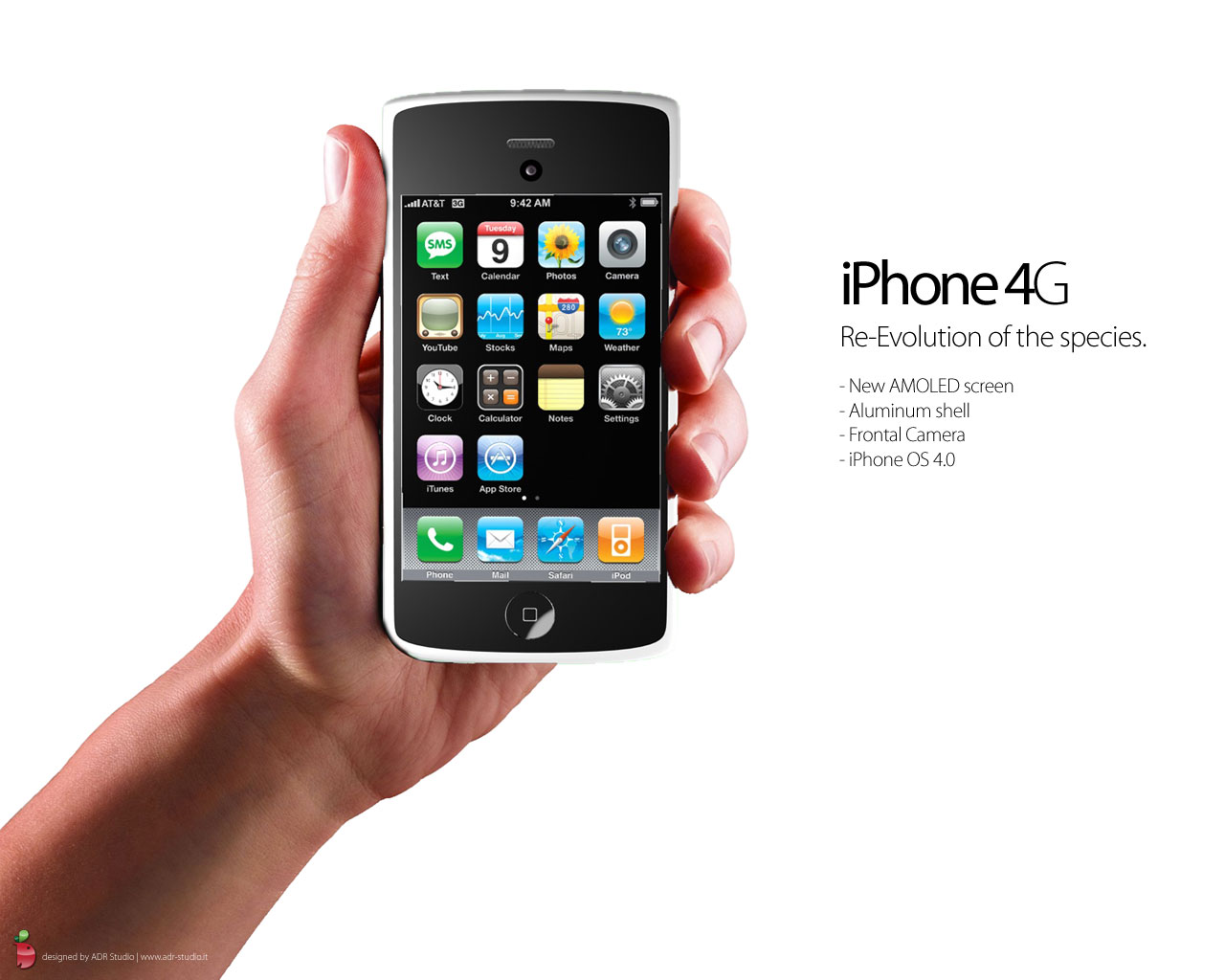
ADR Studio has posted a video and renderings of their concept for the iPhone 4G.

Their design features a new AMOLED screen, an aluminum enclosure, a front facing camera, and iPhone OS 4.0.

You can take a look below...

Read More [via Tuaw]


iBlueNova 2.0.1 Update Fixes Windows 7 Issue


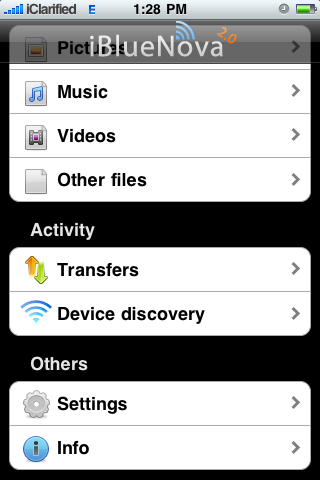
iBlueNova, an application that enables Bluetooth file transfer using your iPhone, has been updated to fix some important issues.

What's New In Version 2.0.1:
- Fixed problem that occurred with the iPhone 2G
- Fixed a problem with Windows 7 (now being able to send and receive files)
- Solved the problems of transfer does not complete
- Improved start times of the daemon to transfer files

To Do List:
- Finished graphics at the interface
- A Fix for the rfcomm
- A Fix for the rpc daemon daemon, which sometimes crashes on the iPhone 2G and 3G

You can find instructions on how to use iBlueNova here. The application can be found on theiSpazio repo and purchased via the Cydia Store for $5.99.


Adobe to Announce New Application in April?


Adobe may be announcing new addition to its signature suite of applications in April.

According to MacWorld, a digital printing conference in Texas is advertising that Adobe will announce the new product in April. Further details weren't available but the event's website says that that this is a brand new application.

Listed as an 'Adobe Technology Preview' by Noha Edell, business development manager for cross media publishing solutions at Adobe, the site for the Emerge conference in San Antonio on April 21-22 says that "Adobe will unveil a brand new application as part of its signature suite of services. Be among the first to see why this is sure to surprise even the most “in the know” Adobe fans".

Adobe has given a few sneak peeks at what's expected to be included in CS5 including a Painter-style paint system and an After Effects-inspired Puppet tool to Photoshop, and iPhone, iPad, and Blackberry app development tools for Flash.

Read More [via MacWorld]


iBlueNova 2.0.1 Update Fixes Windows 7 Issue

iBlueNova, an application that enables Bluetooth file transfer using your iPhone, has been updated to fix some important issues.What's New In Version 2.0.1:
- Fixed problem that occurred with the iPhone 2G
- Fixed a problem with Windows 7 (now being able to send and receive files)
- Solved the problems of transfer does not complete
- Improved start times of the daemon to transfer files

To Do List:
- Finished graphics at the interface
- A Fix for the rfcomm
- A Fix for the rpc daemon daemon, which sometimes crashes on the iPhone 2G and 3G


How to Set a More Secure Alpha-Numeric iPhone Passcode

These are instructions on how to set a more secure alpha-numeric passcode for your iPhone using iPhone Configuration Utility.

Step One
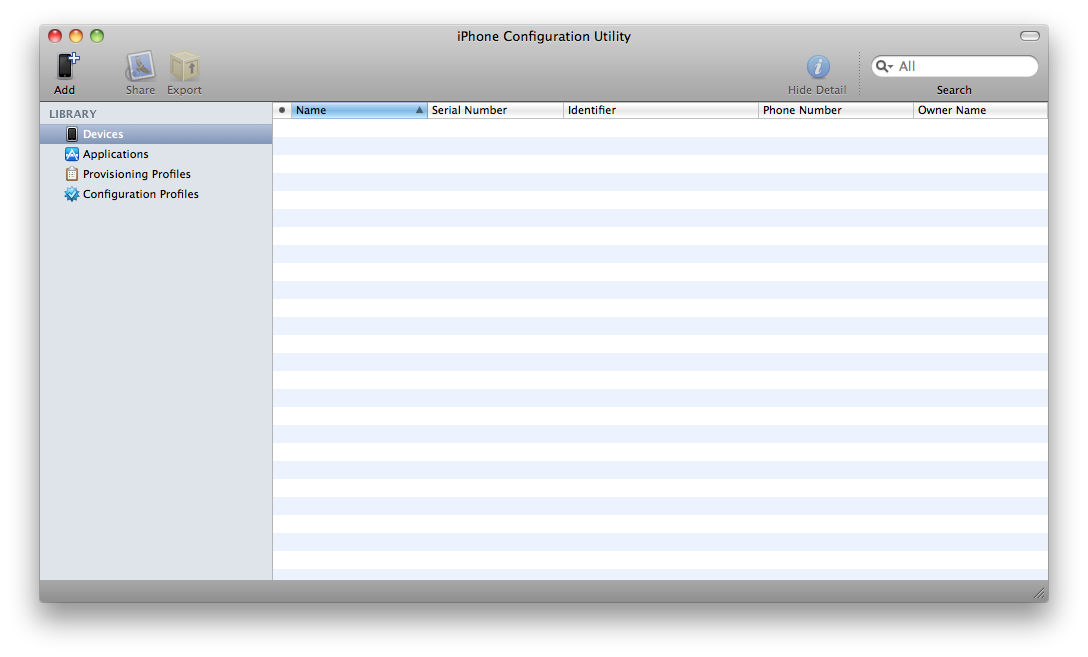
Download and install iPhone Configuration Utility from here:


Step Two
Launch iPhone Configuration Utility


Step Three
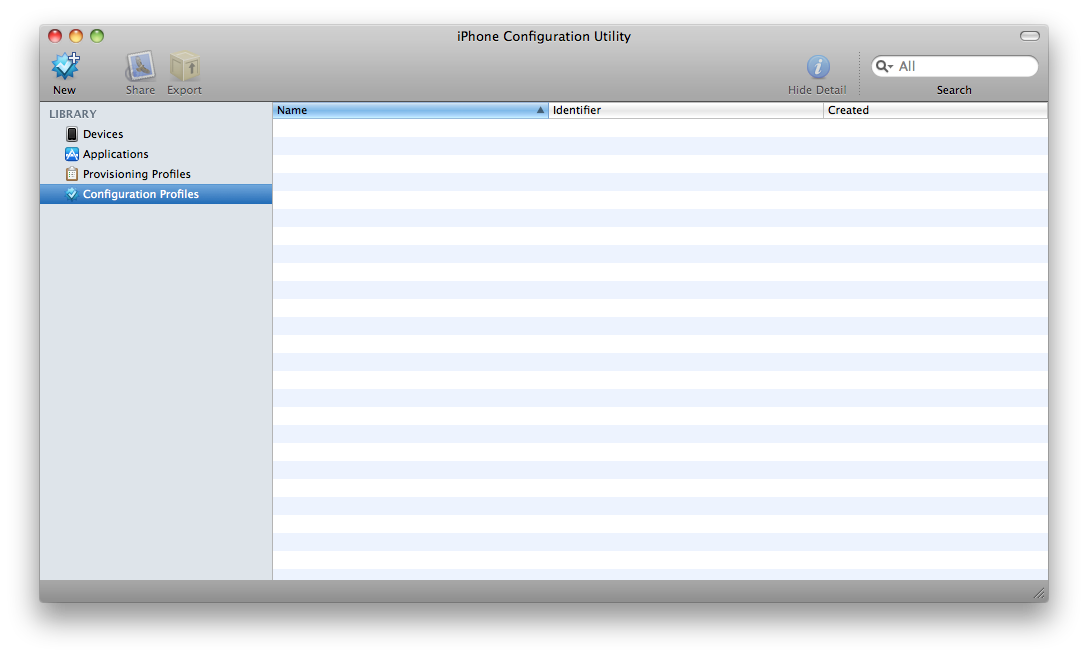
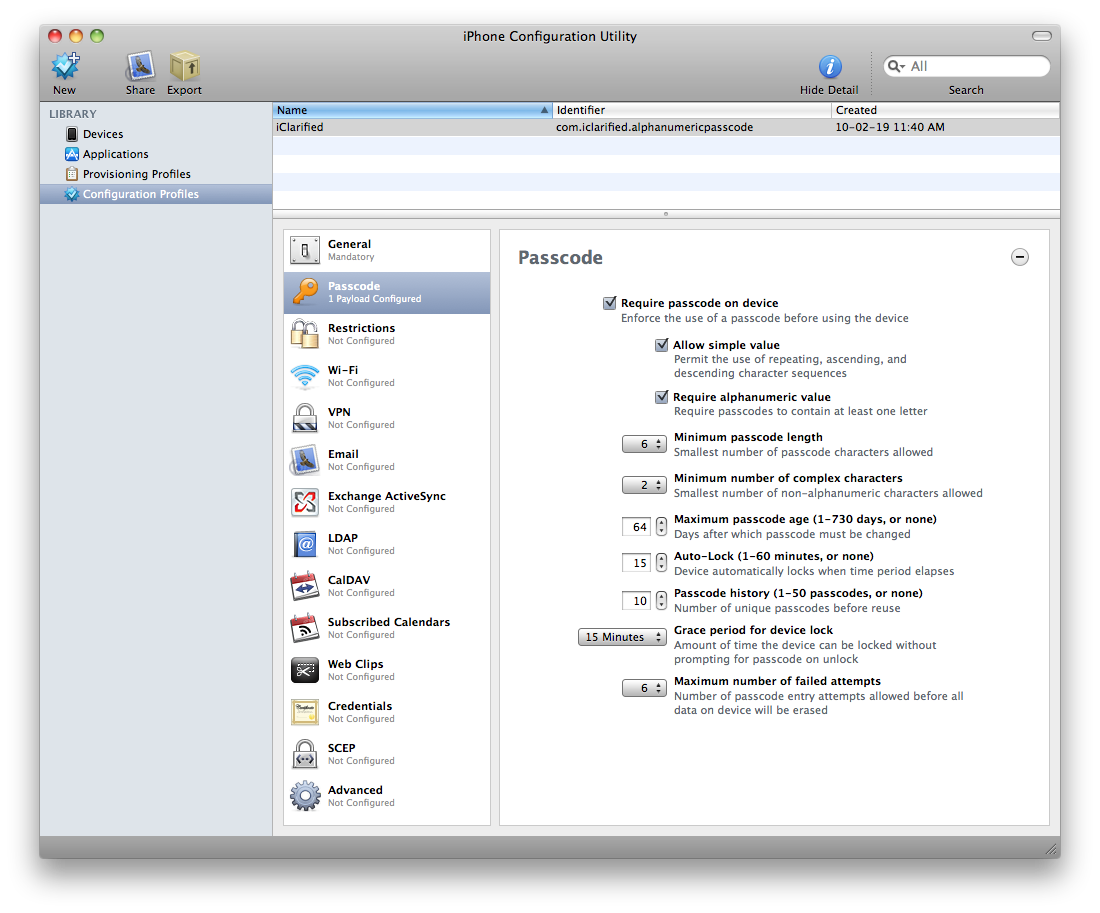
Select Configuration Profiles from the Library at the left of the window.

Step Four
Click the New button from the toolbar

Step Five
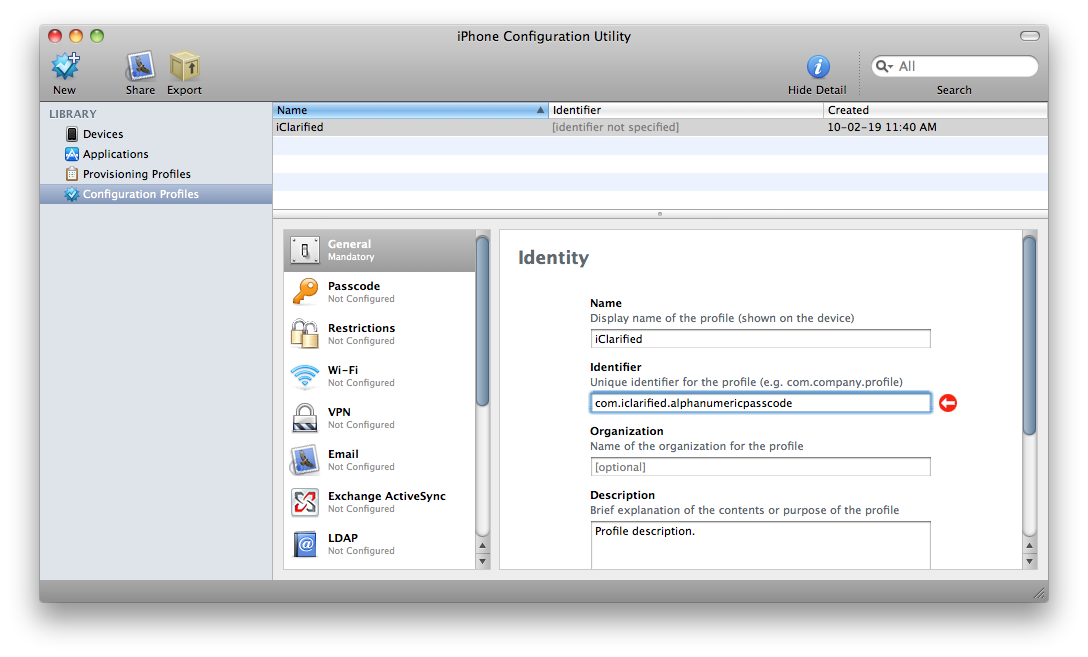
In the General section of the new profile input a name and identifier for the profile. We named our profileiClarified and set our identifier to com.iclarified.alphanumericpasscode in the example.

Step Six
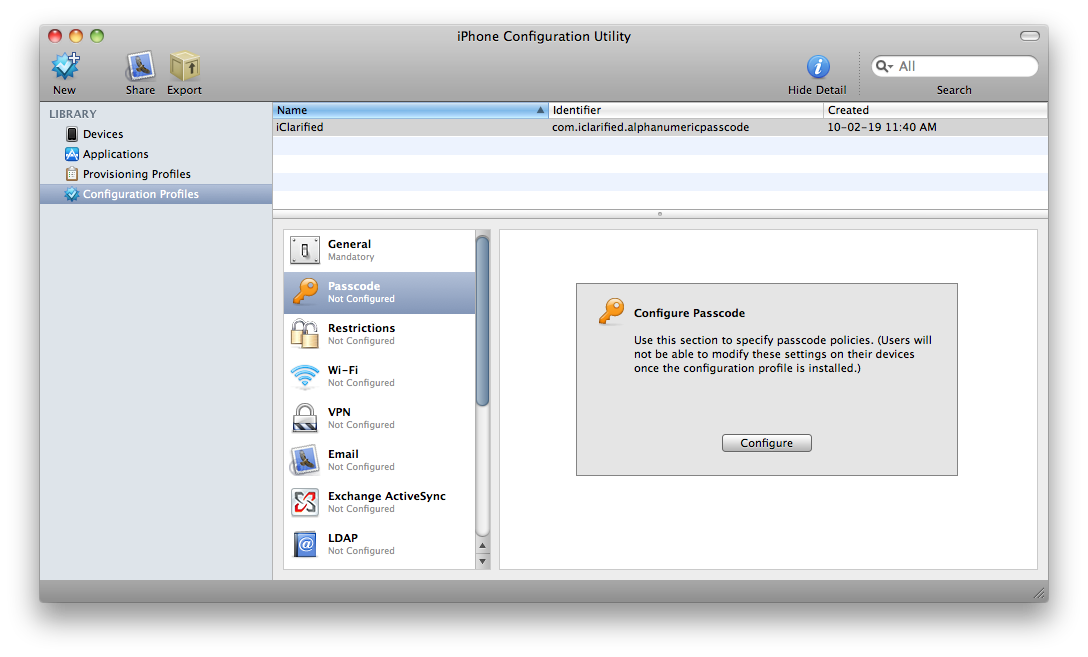
Click to select the Passcode section for the new profile. When prompted click the Configure button.

Step Seven
You can now specify the requirements for your password. Select the Require passcode on device then configure the many settings possible.

These settings include:
- Require alphanumeric value
- Minimum passcode length
- Minimum number of complex characters
- Maximum passcode age
- Auto-lock
- Passcode history
- Grace period for device lock
- Maximum number of failed attempts

Step Eight
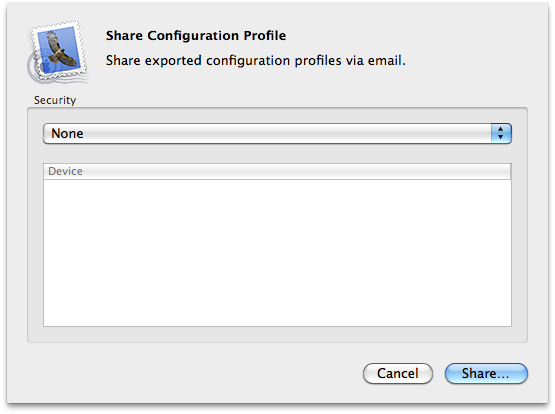
Once you have made all the desired changes to the Passcode section click the Share button on your toolbar.

Step Nine
If required you can sign the configuration profile; otherwise, select None from the security dropdown and click the Share... button.

Step Ten
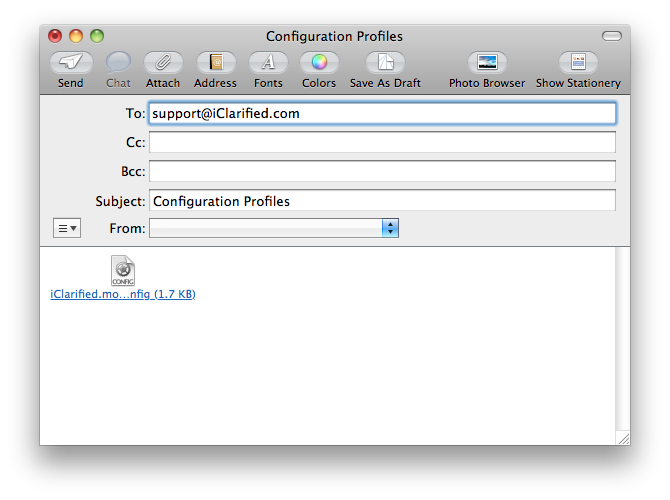
A new email will be created with the mobileconfig file already attached. Email this file to an address accessible on your iPhone.

Step Eleven
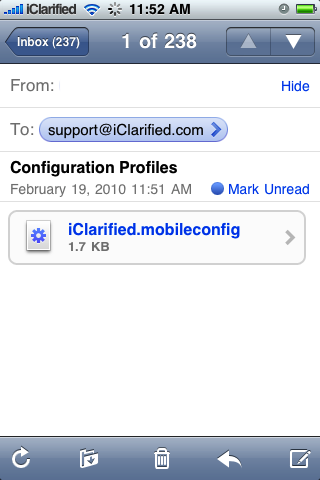
Access the email on your iPhone and press to open the attached mobileconfig file.

Step Twelve
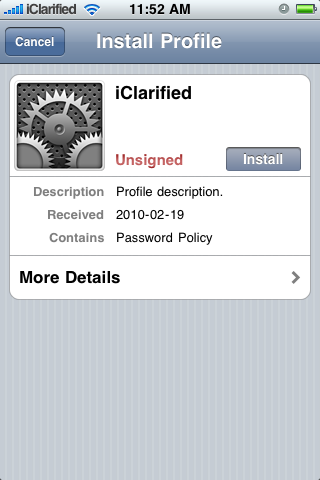
From the Install Profile screen press the Install button.

Step Thirteen
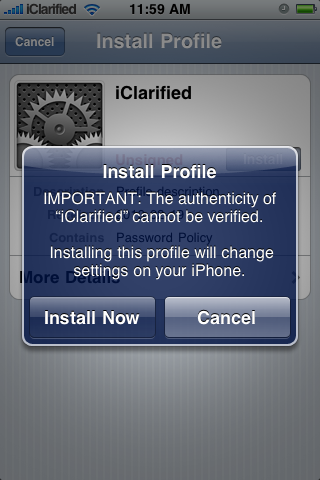
A popup window will appear asking you to configure the installation. Press to select the Install Now button.

Step Fourteen
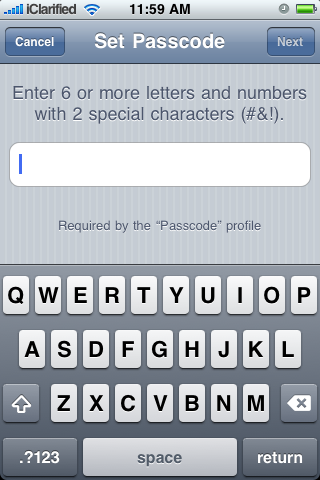
You will now be asked to set a Passcode that meets the requirements you specified earlier.


*Inspired by 9to5Mac

iPhone DevTeam And GeoHot Discussing Exploits For New Baseband


A few weeks ago , we told you that a possible exploit for baseband 5.12.01 was found and unlock might be on its way. And according to aModMyi thread, we are almost there. In the very near future, baseband 05.12.01 could be unlockable for those of us unfortunate enough to be stuck in this position.


Now it doesn’t necessarily mean 3.1.3 will be worked on, but its good news none the less for those unfortunate users, and for the possibility of a group effort for the next unlock between GeoHot and the DevTeam. Discussed in an IRC channel, GeoHot and the DevTeam’s MuscleNerd, share some thoughts on the exploits they have found, and by the looks of things, might actually team up to dish out an ultimate serving of Jailbreaking goodness.


GeoHot explains that there is an exploit that he had previously discovered and wanted to use with the release of blacksn0w, which has now found to still exist in 3.1.3. He goes on to discuss how he had originally wanted to implement this exploit in blacksn0w but opted to go with an open source route, which makes sense to keep things slightly on the downlow.


It sounds as though GeoHot and MuscleNerd (Dev Team) may possibly be working on the same exploit, and if that’s the case, it would be incredibly logical for them to team up rather than releasing two different exploits, which in the end could just cause more greif when upgrading in the future.
What does geohot tweet mean?
<%geohot> its my bb exploit for safekeeping
<%Par4doX> geohot: did you turn that over to the dev team or are you doing something with it?
<%geohot> my days of turning things over are done
<%geohot> i hope its different from the one they have
<%geohot> but they prob already have it
<%geohot> its the one i orig wanted to release blacksn0w with
<%Par4doX> it’s still there in the new bb
<%geohot> yep, just checked
<%geohot> but then opted to use xemn since it was public
Oo, it carries over from 05.11 to 05.12?
<%geohot> why wouldn’t it, apple doesn’t fix things proactivly
<@MuscleNerd> geohot we prob should figure out a way to know if we have same exploit double blind, otherwise we may release 2 different ones at same time
<%geohot> any suggestions?
<@MuscleNerd> not sure how to do that without making it easy to brute force tho
<%geohot> yea, i salted the hash
<@MuscleNerd> yeah
<@MuscleNerd> hmm maybe if we both hash the stack dump
<@Confucious> Can you two take this out of public sight?
<@MuscleNerd> the stack itself, not the header before it or the registers after it
muscle: any notice about the exploits are the same ?
<%geohot> we are working on it
<%geohot> cryptography, perfect for people who don’t trust each other

Again, we don’t expect much for 3.1.3 (Rumor has it OS 4.0 will drop mid March), but this is good news for those of you in an utterly awful situation if your phone has become more like an really expensive iPod Touch.

Gameloft Releases Brothers In Arms 2: Global Front


Gameloft has released their highly anticipated Brothers In Arms 2: Global Front game for the iPhone and iPod touch.

JOIN YOUR ALLIES ONLINE
For the first time, challenge up to 5 friends to multiplayer battles on a variety of five maps in 3 different modes (Free For All, Team Deathmatch, Domination). You can connect locally via Bluetooth or even go online with Wi-Fi to battle friends anywhere.

A FIGHT ACROSS THE GLOBE
Experience every front of the war with battles raging across 5 locations and 13 levels: Pacific, Normandy, North Africa, Germany, Sicily.

WAR MACHINES
Take control of 3 different vehicles including the tank, off-road vehicle or glider to overrun your opponents - or to make a daring escape. You can even jump behind the vehicle turret to lay waste to foes with the machine gun.

THE BATTLE COMES TO LIFE
The stunning graphics and authentic settings are inspired by real life battlefields from WWII and created in detailed 3D.

AN EPIC EXPERIENCE
Witness compelling cinematic moments with more interaction between you and your squad members that deepens the gameplay.

AN ARSENAL AT YOUR DISPOSAL
Grab a wide variety of historically accurate weapons including machine guns, bazookas, sniper rifles and flamethrowers.

You can purchase Brothers In Arms 2: Global Front from the App Store for $7.99.


Another Possible Unlock Source for the iPhone 05.12.01 Baseband


M
uscleNerd just re-found a crashing command the yellowsn0w iPhone unlock was originally going use.

Ha just re-found crashing command yellowsn0w was originally going to use before +stkprof. Apple fixed it *accidentally* in 02.28.00.

some commands have come and gone. some command holes have come and gone. this command has come and gone but not the hole:)

it still seems accidental though :) there are no overt signs that they've closed the hole, but the byte alignment kills it


Earlier this month Sherif Hashim also found a baseband crash that might be exploited to bring a real unlock.

MuscleNerd also mentions a "bizzare apple rogue interpreter" that is letting him poke any values into BB memory.

Hopefully these findings will bring about an unlock in the near future.

Read More


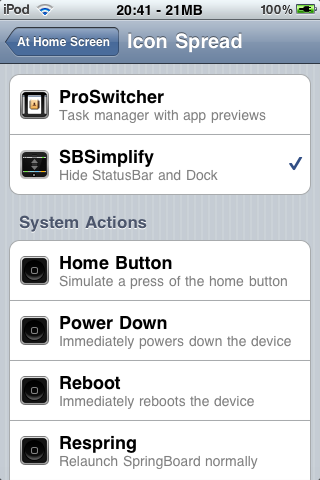
SBSimplify Hides Your iPhone Status Bar and Dock


A new iPhone tweak by EyeDevs lets you set any LibActivator action to hide or show the Dock and the Status Bar

It`s time to see the beauty of your real SpringBoard! Ever annoyed by the the Dock and the Statusbar making your HomeScreen look squeezed? Now you can get rid of that.

To use this tweak you must first assign some gesture or action using Activator. Go into the Settings app and find the Activator section. Use the options to configure and choose which type of action will trigger SBSimplify

You can purchase SBSimplify from the Cydia Store for $0.99.


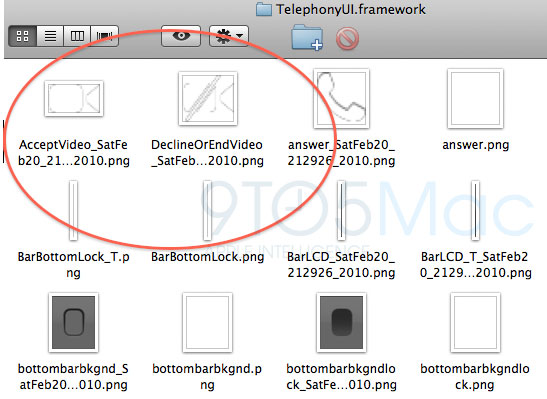
Evidence Suggests Video Chat for Next iPhone

New evidence found in the iPhone SDK supports the rumor that the next generation iPhone will support video chat.

9to5Mac has found a few icons in the SDK that seem to "indicate that there will be video calling on an iPxxx device."


Additional evidence was found hidden in the underlying iPhone telephony apps which contain some "VideoChat strings that are equally, if not more, damning evidence of future VideoChatting capabilities."

Photoshop Develops An iPhone Replica Of Photoshop 1.0 For Its 20th Anniversary


The app is a replica of the original Photoshop PC program, which premiered in 1990.”I really wanted to do something special to commemorate 20 years of Photoshop, and the best thing I thought of was a nostalgic iPhone app,” said Russell Brown, Adobe’s Senior Creative Director. Brown was also part of the original Photoshop team

John Knoll released Photoshop 20 years ago next month with his brother, Thomas. It changed the world of graphics and digital photography in a big way.

Put Your Contacts On Your iPhone Lockscreen

Front Contacts is a new Cydget by Roberto Fischer that puts your contacts onto your iPhone lockscreen.

Front Contacts provides a quick way to contact people through the lock screen with a really simple and friendly interface and complete functionality, acting as a "non editable" Phone app. Navigation is smooth and intuitive, controlled by the home button and swipe gestures.

Features:
- Filtered contacts list with photos
- Recent calls history
- Phone pad
- Contact details with phone, email, URL and address
- Search contacts
- Slide to confirm lock protection on all actions

Features planned for next release:
- Background image
- More customization
- Send me your requests!

You can purchase Front Contacts from the Cydia Store for $3.99.


How to Backup and Restore Your Cydia Applications Using PkgBackup

These are instructions on how to backup and restore your list of Cydia applications using PkgBackup.


Step One
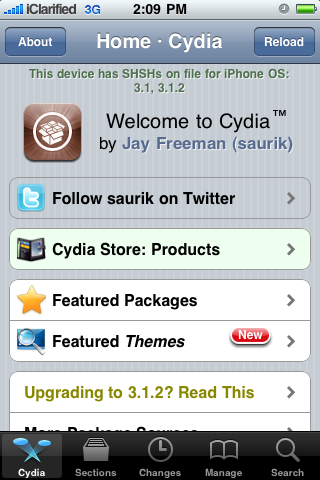
Press to launch Cydia from your iPhone Springboard

Step Two
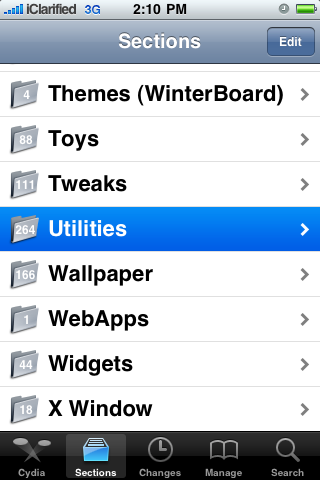
Press to select Sections from the tabs at the bottom of the screen

Step Three
Press to select Utilities from the list of Sections

Step Four
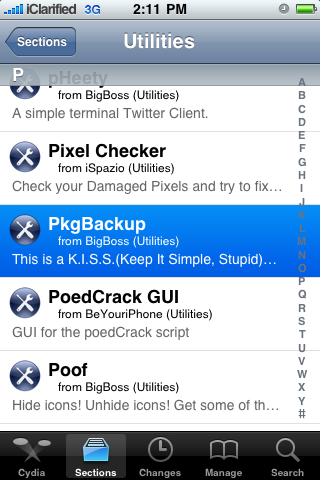
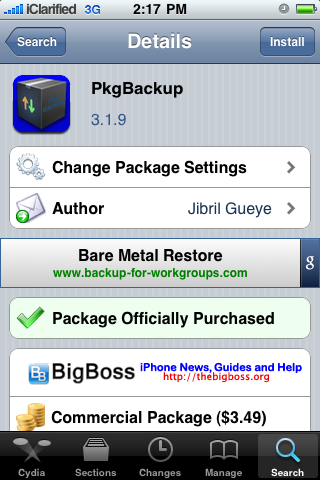
Press to select PkgBackup from the list of Packages

Step Five
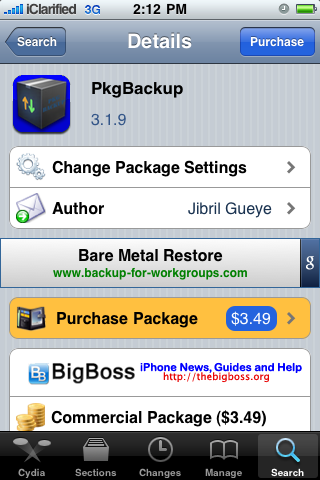
Press to Purchase PkgBackup from the Cydia Store for $3.49. Once you have entered your payment information you will be returned to the package information view where you can now press the Install button at the top right of the screen.

Step Six
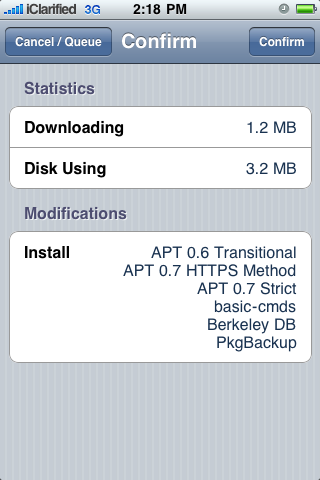
Press the Confirm button to begin your installation.

Step Seven
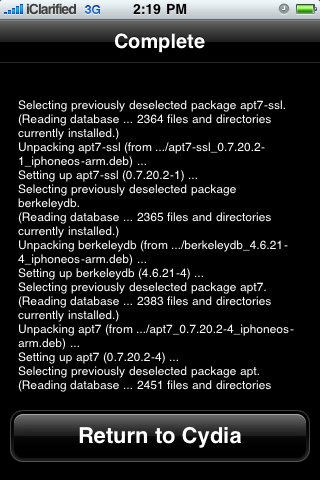
Once installation has completed successfully press the large Return to Cydia button.

Step Eight
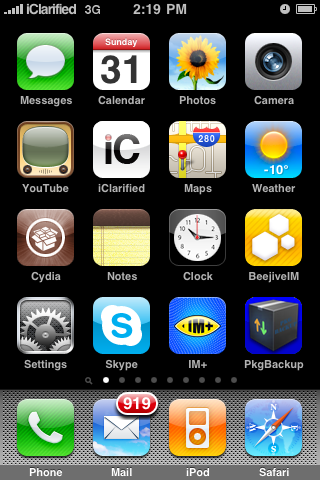
Press the Home button to return to your Springboard then launch the newly installed PkgBackup application.

Step Nine
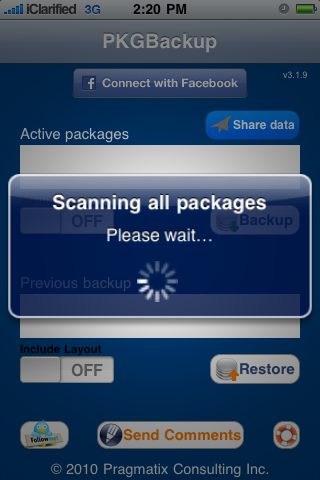
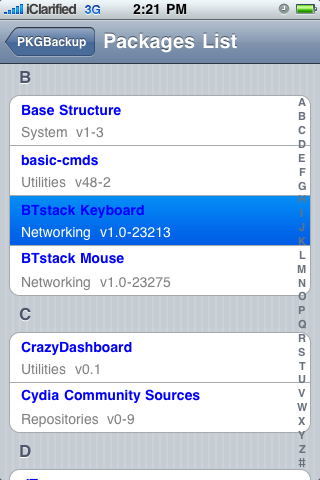
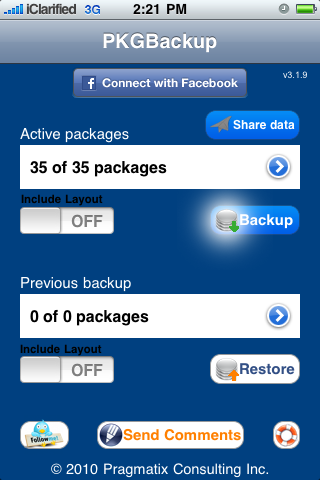
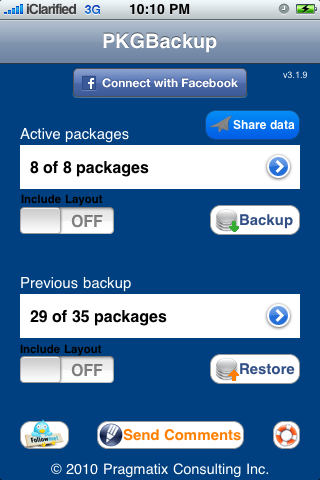
PkgBackup will begin by scanning all your installed packages. Press the blue circular arrow button to view the list of active packages.

Step Ten
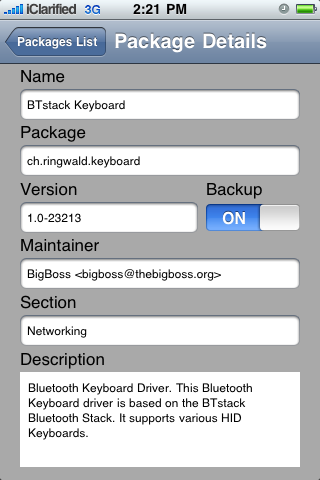
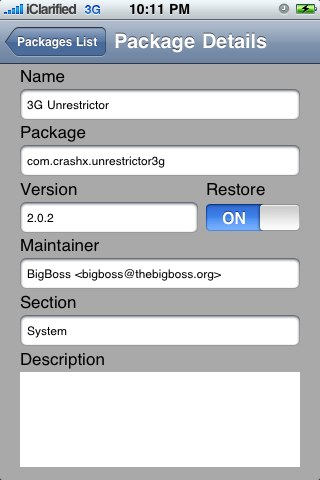
Press to select an application from the list. From the package details window you can enable or disable backup of that particular package.

Step Eleven
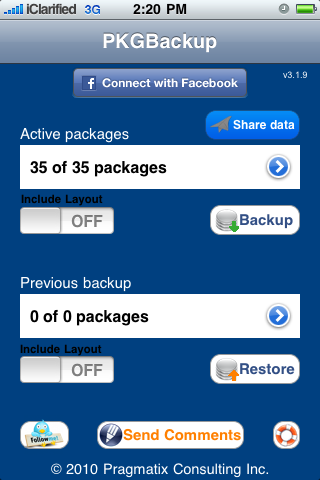
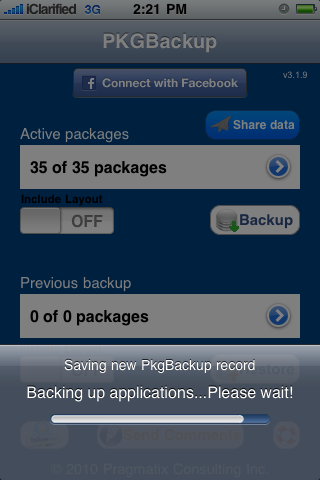
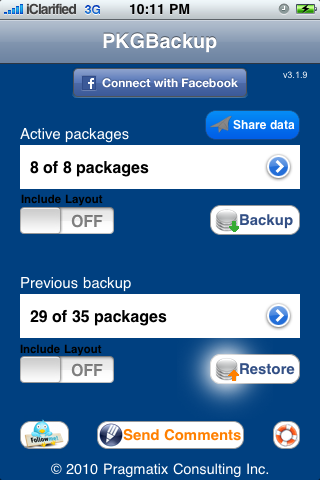
From the main screen you can turn the Include Layout switch to ON if you would like to save your Springboard layout. Next, press the Backup button to begin backing up your application list.

Step Twelve
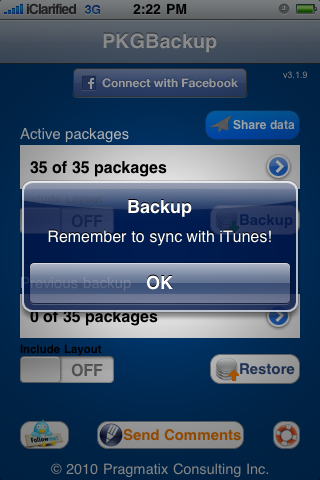
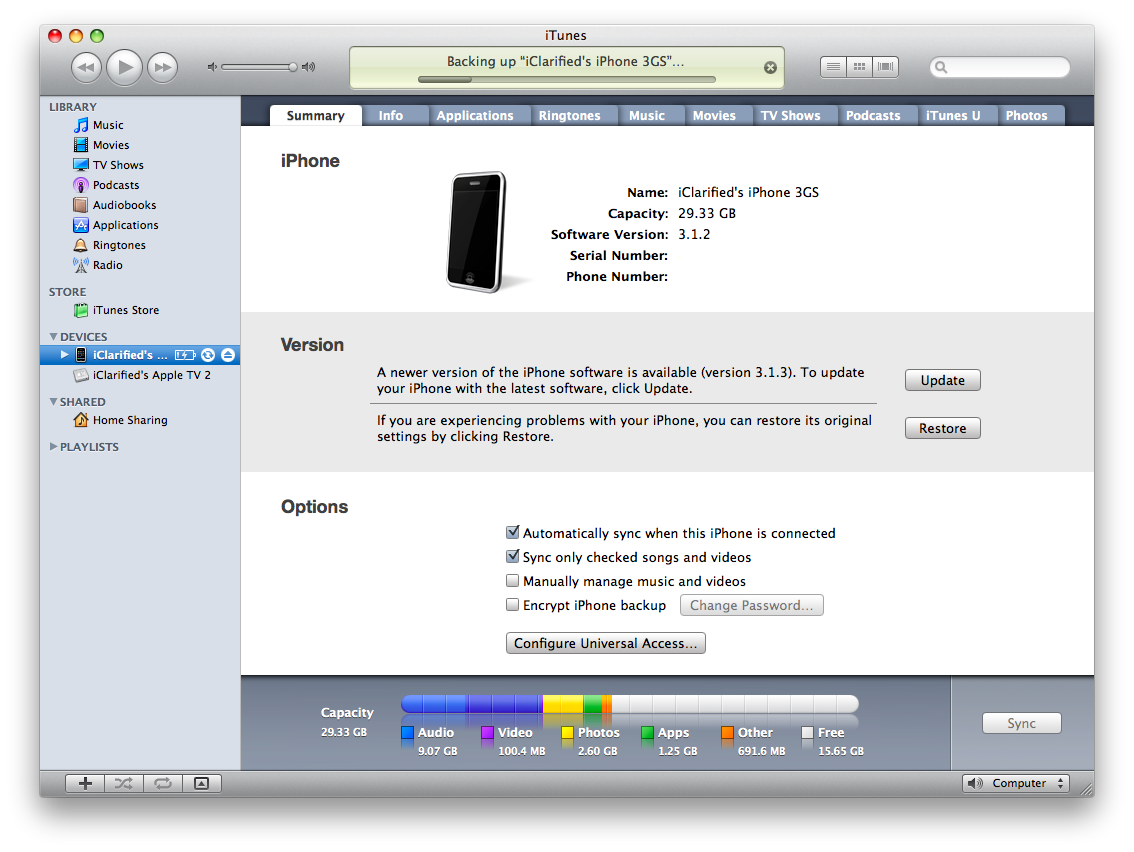
Once Pkgbackup is finished it will prompt you to sync with iTunes. Press the large OK button then connect your iPhone to iTunes and perform the sync. Make sure that iTunes successfully completes a backup during the sync process.


Step Thirteen
If your firmware has been restored and you have lost your Cydia applications the first step is to restore the backup we just made in iTunes.

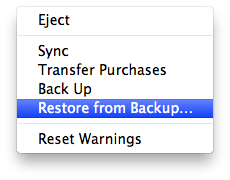
To do this, either Ctrl-Click or Right-Click on the iPhone in the list of devices in iTunes. Select Restore Backupfrom the popup menu that appears.

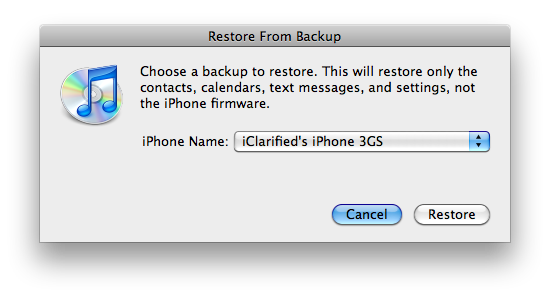
Chose the backup you would like to restore to from the list then click the Restore button.

Step Fourteen
Once the backup has been successfully restored to the iPhone you will need to follow Steps One through Eight again to install and launch PkgBackup.

Step Fifteen
Notice PkgBackup will detect how many packages you have installed and how many packages are available for installation from your previous backup.

Step Sixteen
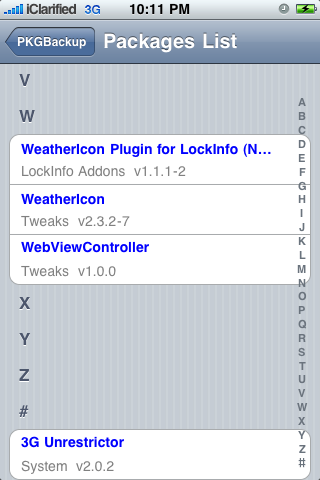
Press the blue circular button to see the packages from your previous backup. You can select an individual package to see its details and set whether or not it will be included in a Restore.

Step Seventeen
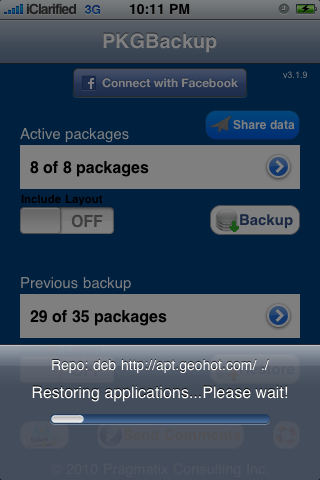
Press the Restore button to begin installing all your missing applications.

Step Eighteen
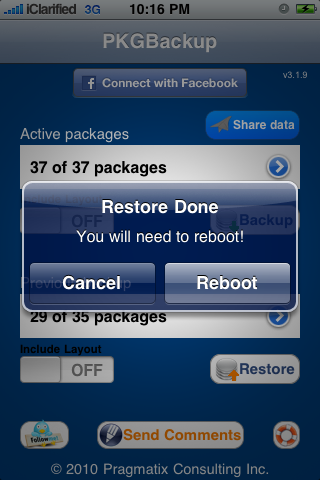
Once its done installing your applications PkgBackup will ask you to reboot. Press the Reboot button.

Step Nineteen
Once your iPhone restarts you will have all your applications back!

 
 iPhone © 2012 | Designed by LogosDatabase.com, in collaboration with Credit Card Machines, Corporate Headquarters and Motivational Quotes