Belkin iPhone Gaming Controller?

Apple News
It seems that iControlPad may have some major competition from the likes of Belkin and their JoyPod.

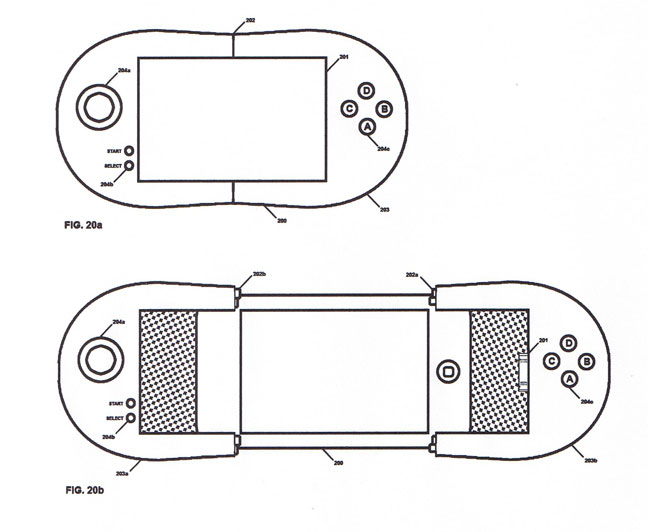
TouchArcade first reported receiving a sketch image that had been submitted anonymously and simply claimed that testing would begin in October.

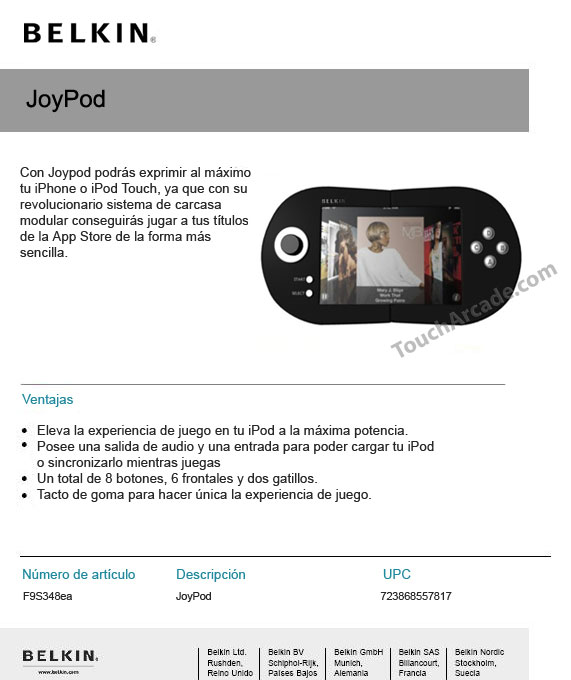
They have now received a new image which suggests that this upcoming iPhone controller is actually from major accessory manufacturer Belkin and does indeed have official App Store support:

The ad copy promotes using the Joypod to squeeze the most out of your iPhone or iPod Touch to play App Store games in the easiest way.

Features:
- 8 buttons total (6 on the front)
- Audio output
- Dock connector for power and syncing

If this is true, it suggests that Apple will be building support into the official SDK. Meaning AppStore games will be able to take full advantage of these controllers.

Read More [via iPhoneFreakz]


Video of Last.fm v2.0 (1.1) Leaked

Apple News

Kevin Rose, founder of Digg, has leaked another news item, this time posting a video walkthrough of the future Last.fm app.

Rose tags the video as v2.0; however in the clip it shows a version of 1.1. This is still newer then the 1.0.2 in the AppStore.

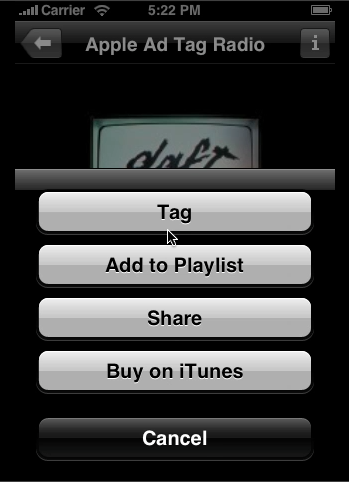
The Last.fm application video shows off some of its features such as: sharing music, creating playlists and tagging songs.

You can download the video walkthrough here

How to Unlock/Jailbreak Your 2.0.x 2G iPhone (Windows) [WinPwn 2.5]

These are instructions on how to unlock and jailbreak your 2.0.x 2G iPhone using WinPwn 2.5 for Windows. They have been updated for iPhone firmware 2.0.2.

To follow this tutorial you will need to have iTunes 7.7 installed (make sure to reboot). Also, you may need to download and install .Net Framework if you are on Windows XP. Finally, make sure you completely uninstall any previous version of WinPwn. Thanks to cmw for all his hard work on this!

**********
This tutorial has been updated to get around the WinPwn bug that causes ipsw creation to crash in simple mode
**********

Step One
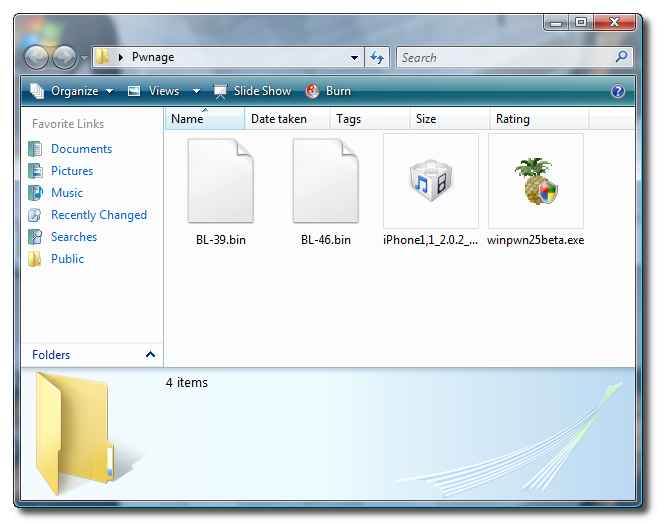
Create a folder on your desktop called Pwnage. In it place Winpwn 2.5 (mirror), 3.9BL , 4.6BL, and the latest 2.0 firmware.

2.0.2 (2G): iPhone1,1_2.0.2_5C1_Restore.ipsw


Step Two
Install WinPwn by double clicking the downloaded executable. Once WinPwn has been installed it will put a shortcut icon on your desktop. Double click to launch the application.


Step Three
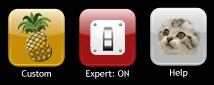
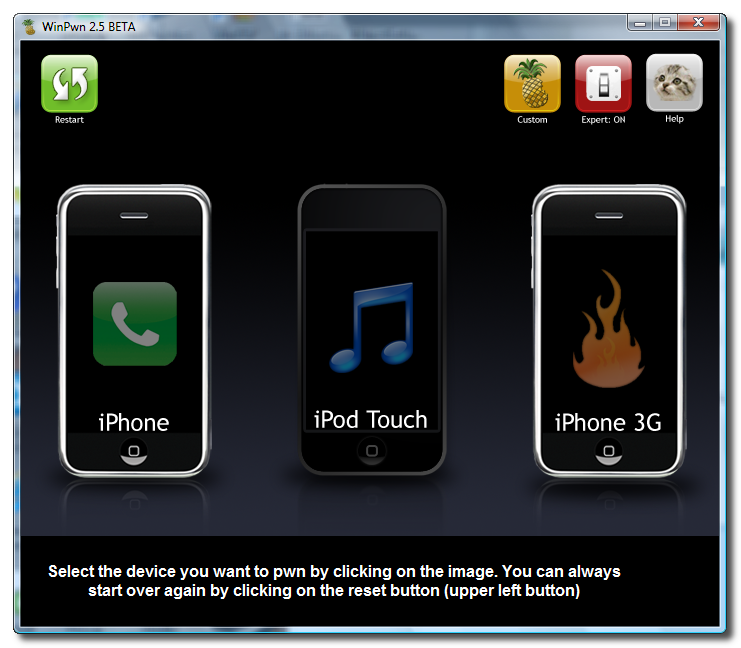
Once WinPwn has opened click the Expert Mode switch to turn Expert Mode ON.


Now click to select the iPhone 2G.


Step Four
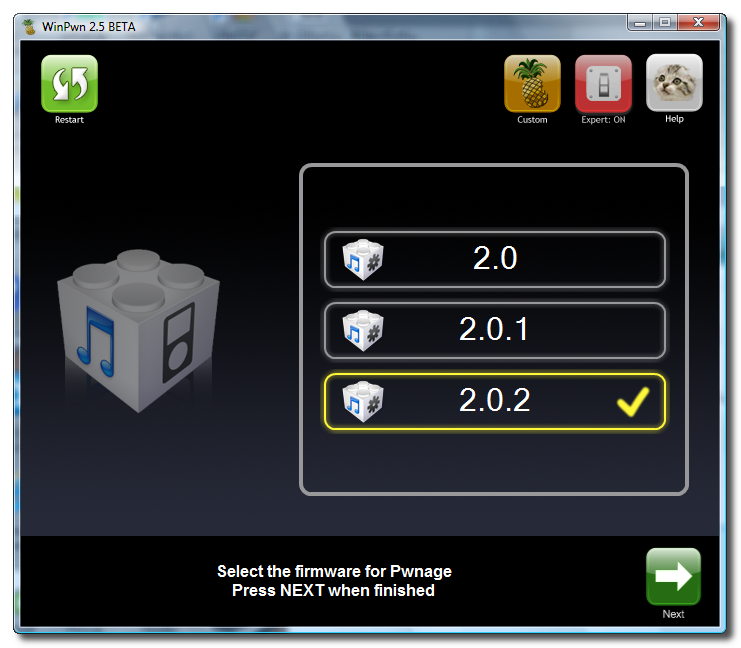
You will then be asked to select the firmware you would like to use. Do this then click the green right arrow at the bottom right of the window.


Step Five
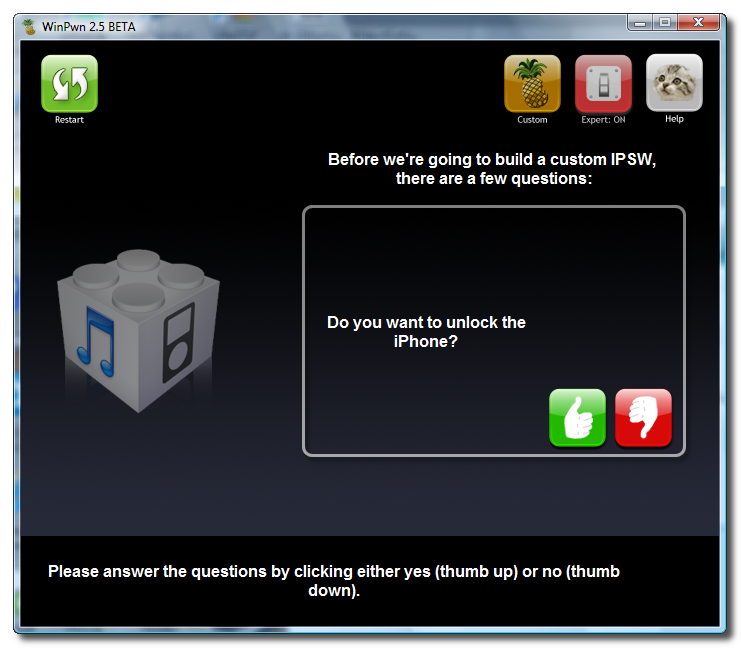
You will then be asked if you would like to unlock the iPhone. Most likely you will want to click the green thumbs up button.


Step Six
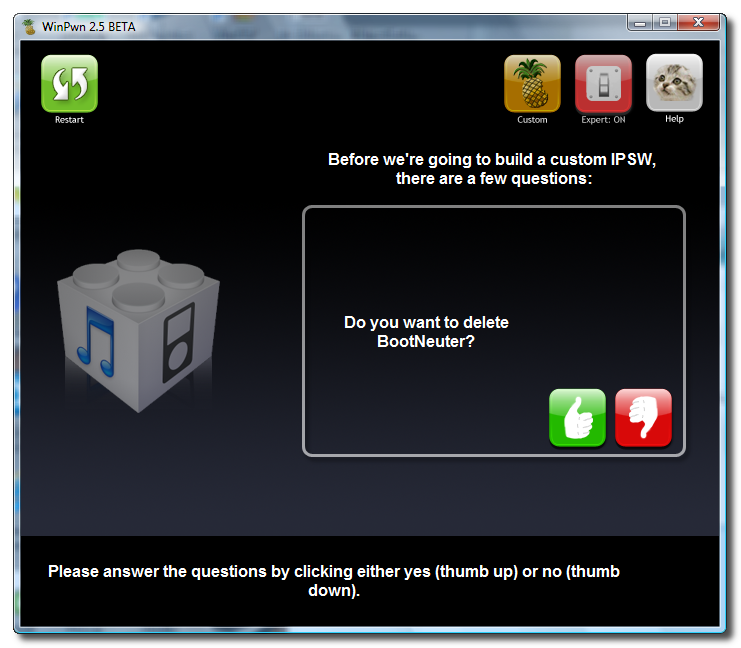
You will then be asked if you would like to delete BootNeuter after it completes. Most likely you will want to click the green thumbs up button.


Step Seven
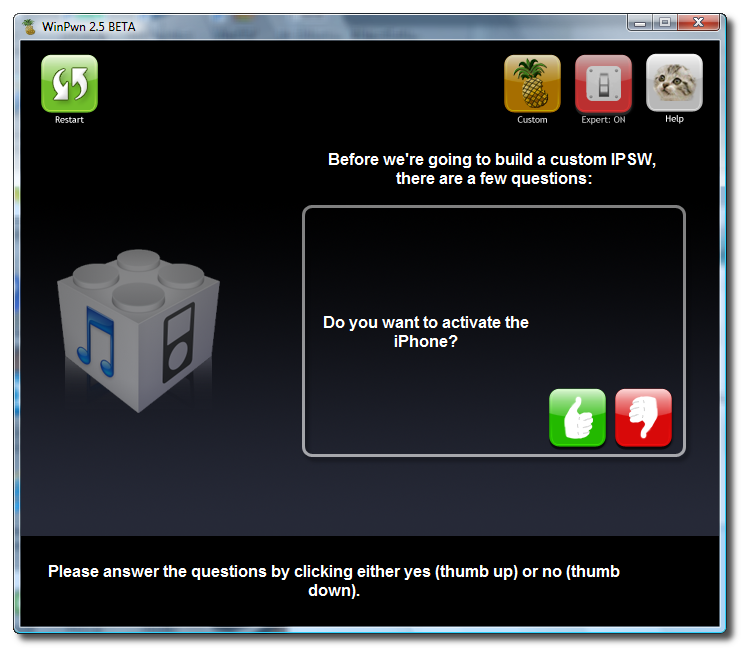
WinPwn will now ask if you want to activate your iPhone. If you are not on an official carrier then you will want to click the green thumbs up button.


Step Eight
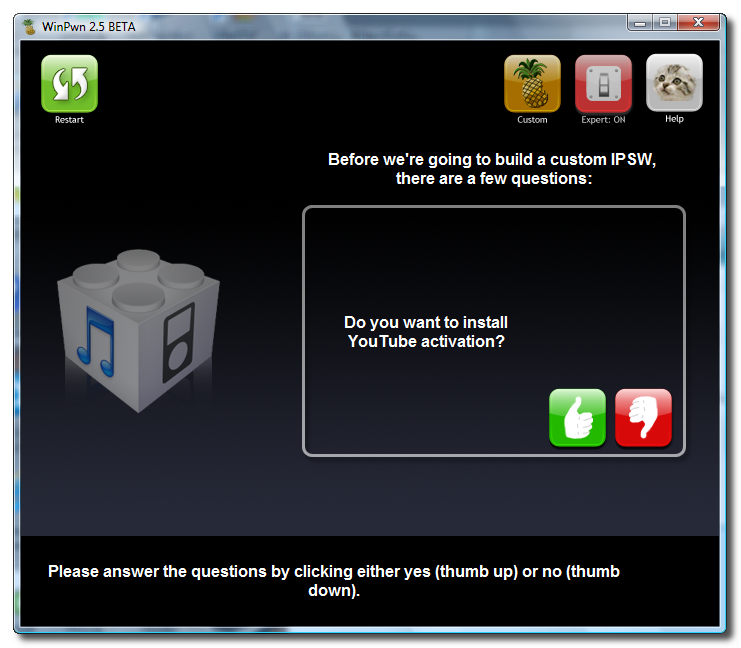
You will now be asked if you want to install YouTube activation. Again if you are not on an official carrier then you will want to click the green thumbs up button.


Step Nine
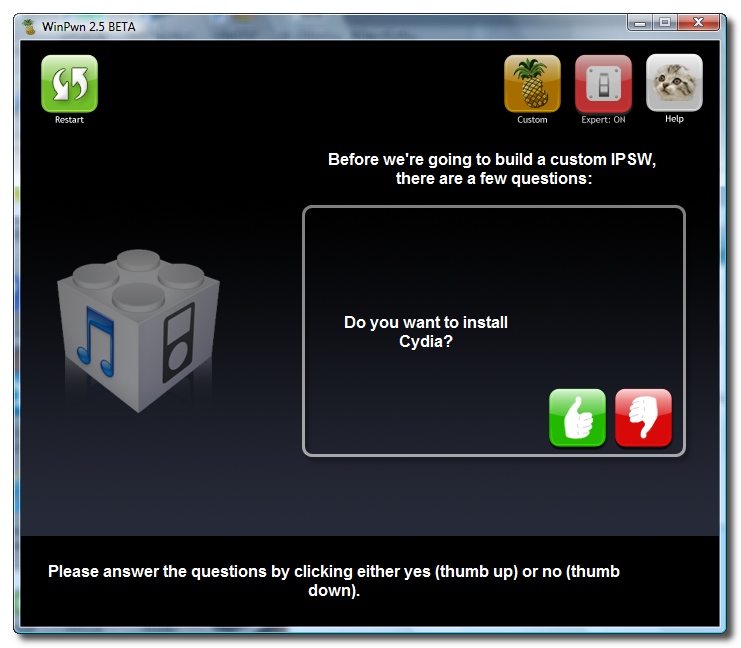
You will be asked if you wish to install Cydia. Click the green thumbs up button.


Step Ten
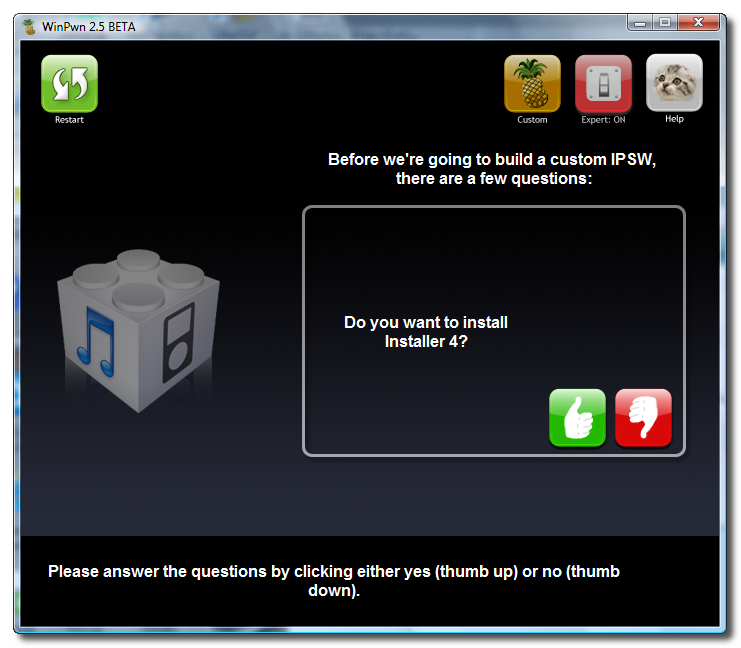
Next you will be asked if you want to install Installer 4. Click the green thumbs up button.


Step Eleven
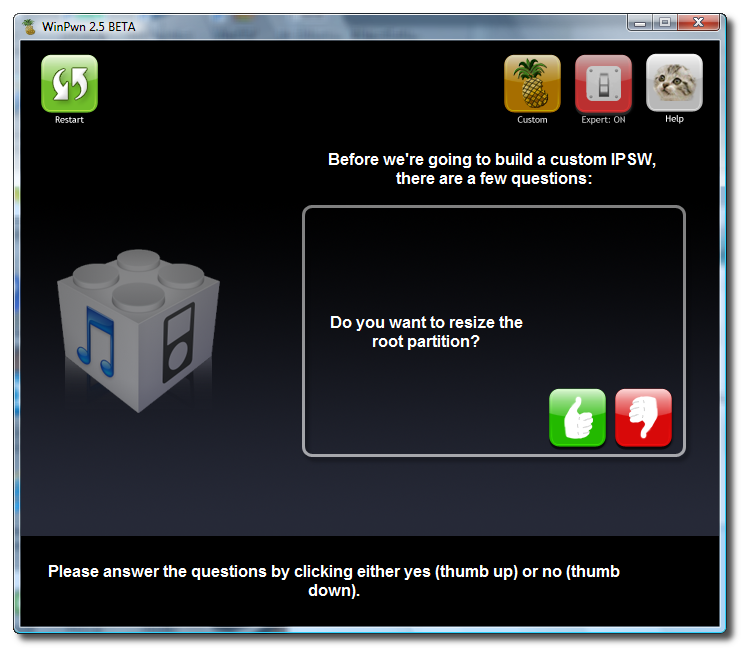
WinPwn will then ask if you wish to resize the root partition. Click the green thumbs up button.


Step Twelve
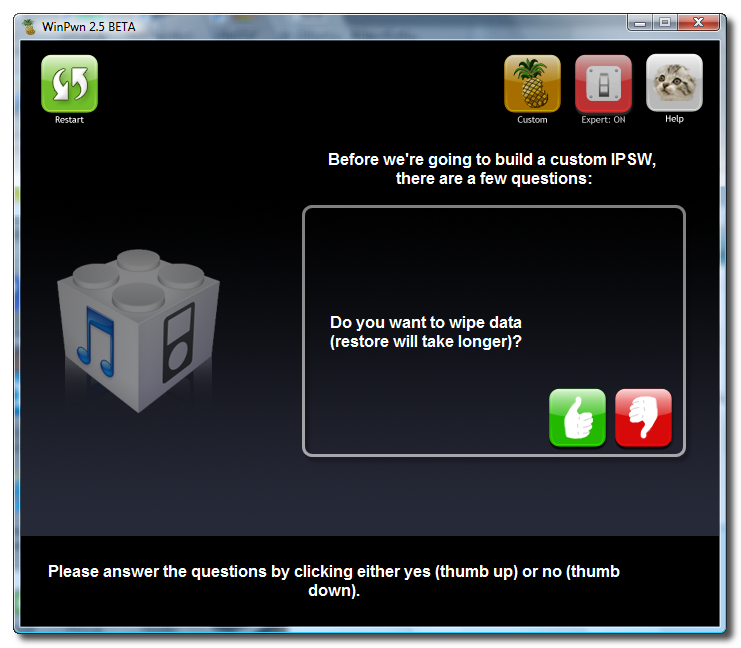
If you want to wipe data when doing the restore click the green thumbs up button. Note: this will take longer and I clicked the red thumbs down button.


Step Thirteen
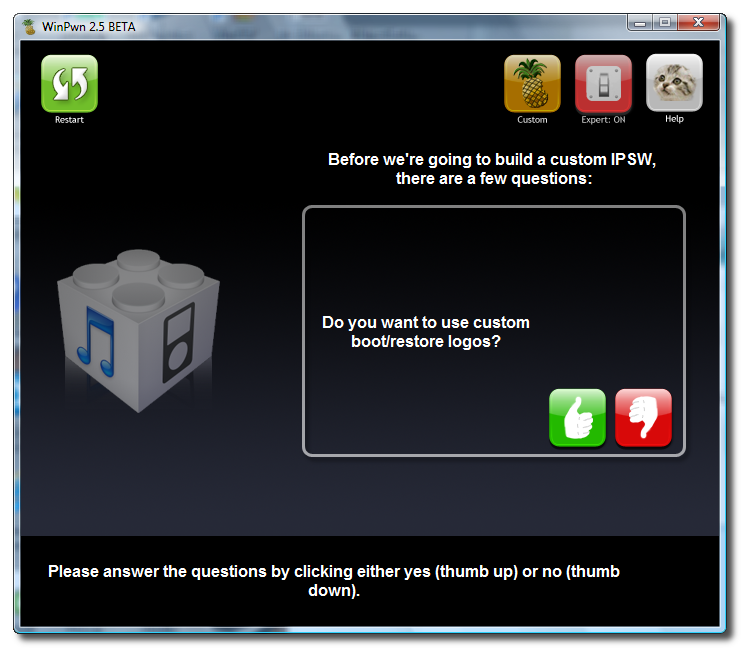
WinPwn will then ask if you would like to use custom boot/recovery images. Click the green thumbs up button if you would like to.


Step Fourteen
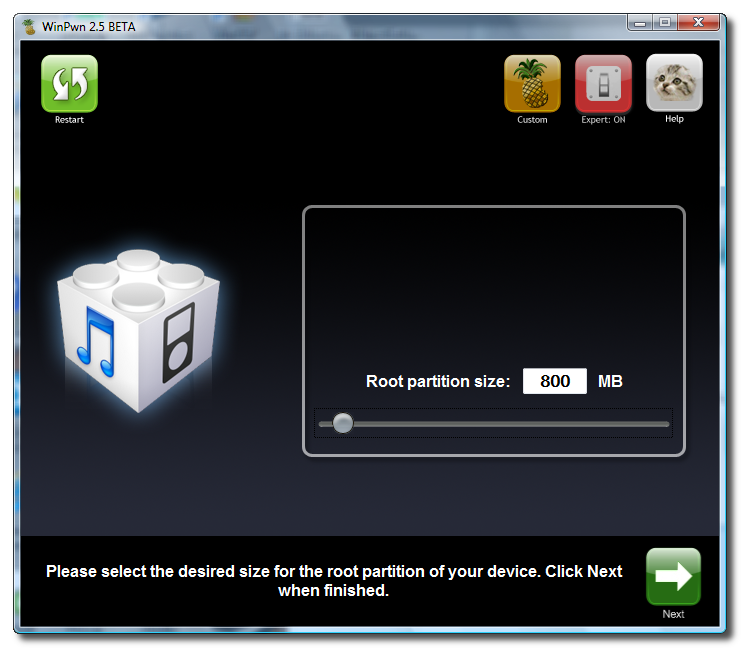
You will now be asked to set the size of your root partition. Move the slider to select a partion size of 800mb.


Step Fifteen
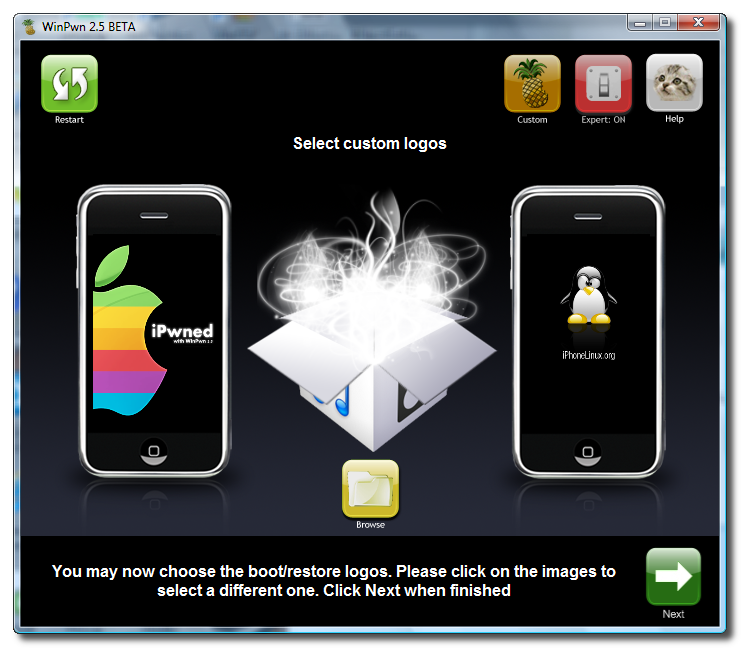
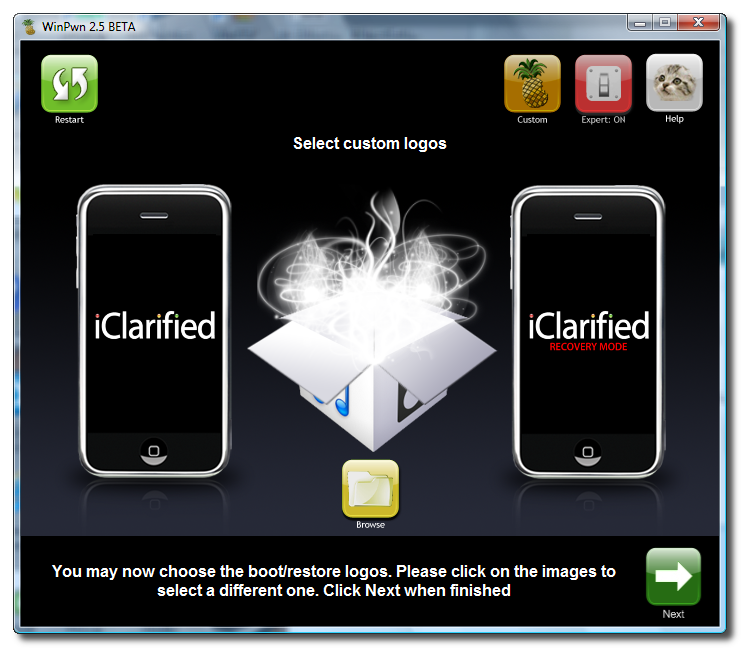
You will now be able to select your custom images. Click the iPhone on the left to select your boot logo. Click the iPhone on the right to select your recovery logo.


Remember the rules for them: RGB or Grayscale format with Alpha channel and dimension bellow 320x480. If you would like to use the iClarified ones they can be found here: Boot Logo, Recovery Logo

Click the green arrow button to continue.


Step Sixteen
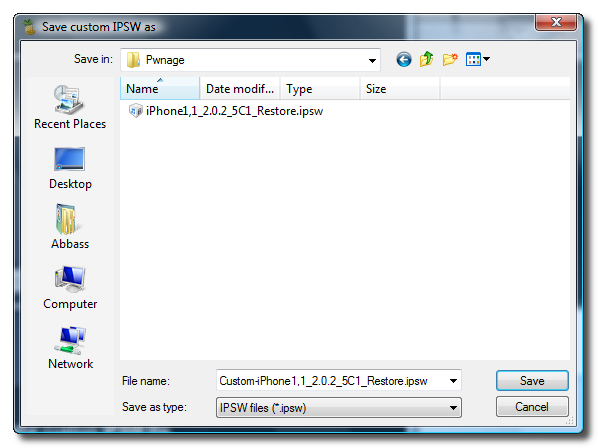
WinPwn will now ask you to select a location to save the Custom IPSW. Navigate to the Pwnage folder you created on your desktop and click the Save button.


Step Seventeen
WinPwn will now search for your ipsw firmware file. If it cannot find it you will be asked to search manually. Click the green thumbs up button then navigate to the Pwnage folder on your desktop and select the ipsw you downloaded in Step One.


Step Eighteen
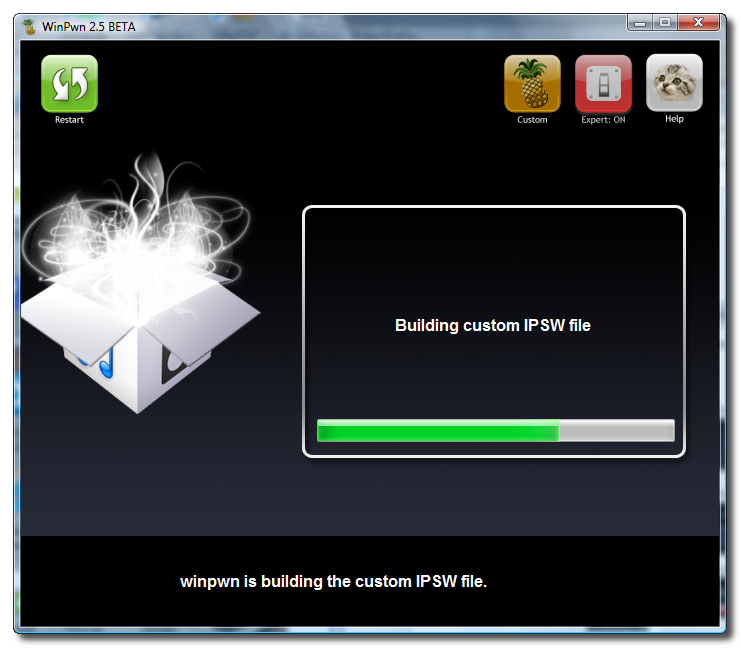
WinPwn will now build your custom ipsw.


Step Nineteen
WinPwn will then prompt you to connect your iPhone via USB and make sure its turned off. Do this then click the green thumbs up button.


Step Twenty
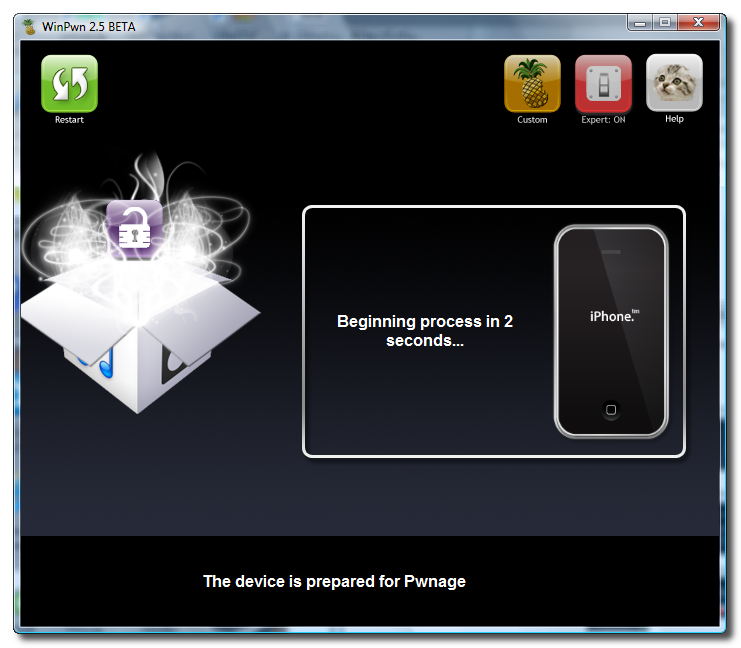
WinPwn will then say its ready to start Pwnage. Click the green OK button.


Step Twenty One
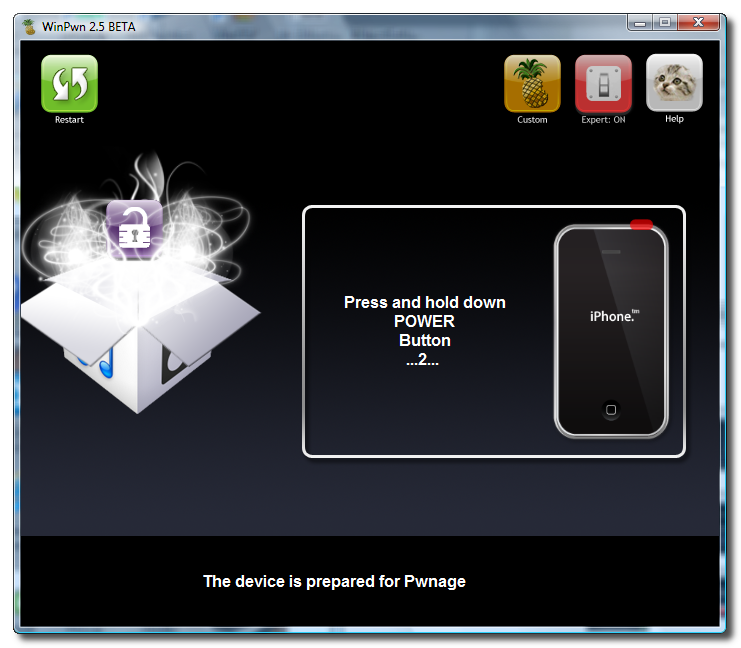
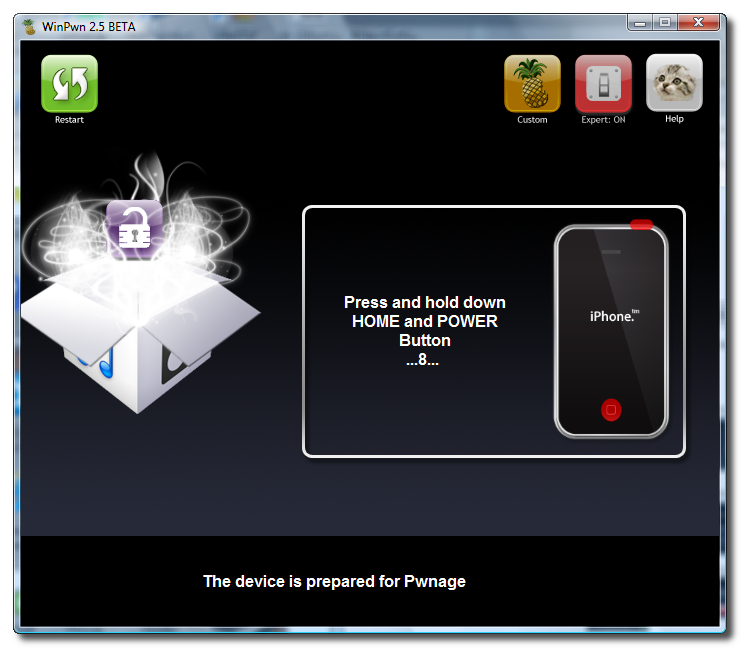
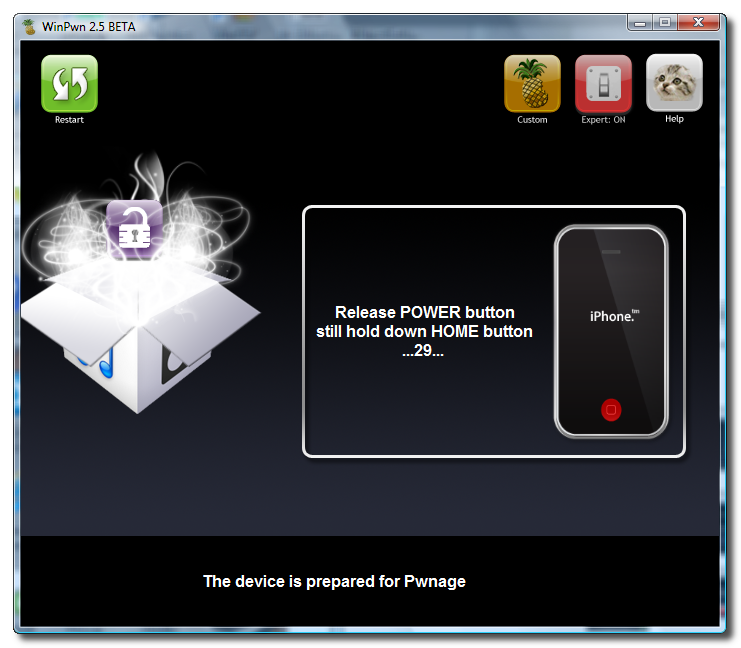
Be ready to follow directions now. It will ask you to hold the home button and the power button for 10 seconds. Then, you will have to release the power button and hold the home button for 10 seconds to enter DFU.


Step Twenty Three
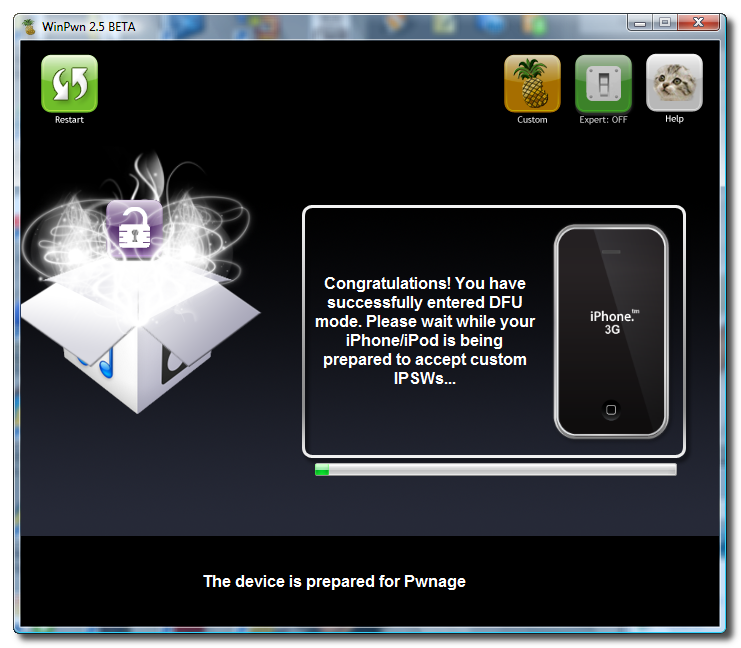
Once you iPhone is in DFU mode WinPwn will begin the pwnage process.


You will be informed when pwnage is complete.


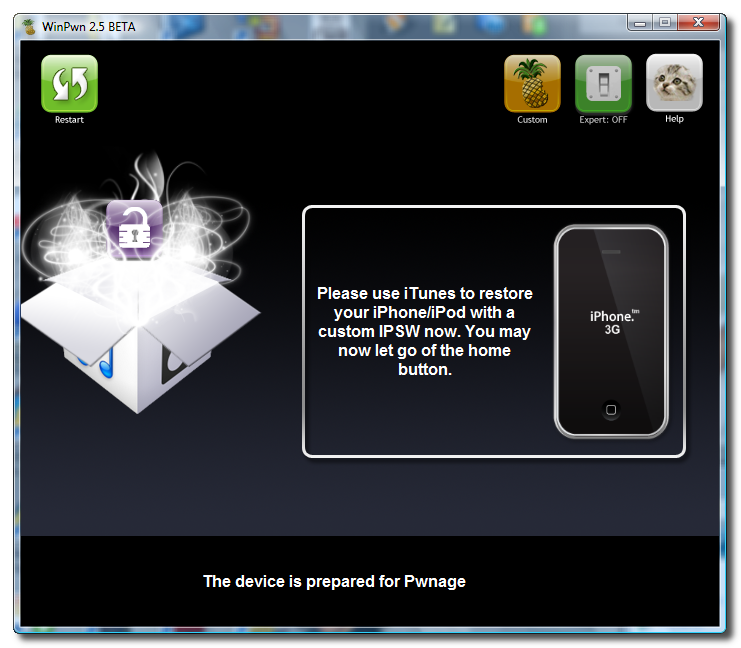
Notice your iPhone will show a message saying, "Ready to Restore Custom IPSW".


Step Twenty Four
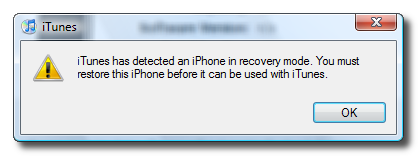
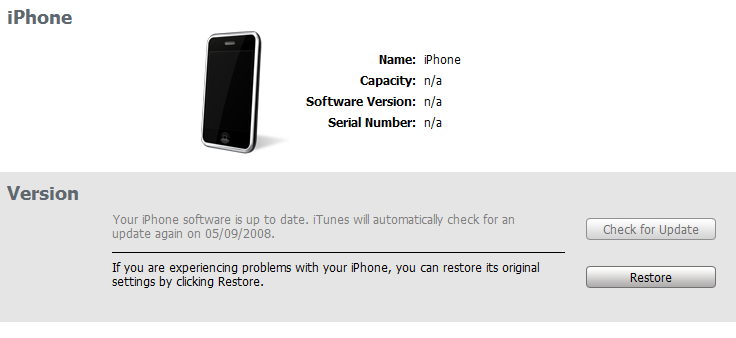
iTunes will now prompt you that you are in recovery mode.


Hold down Shift and click the Restore button in iTunes.

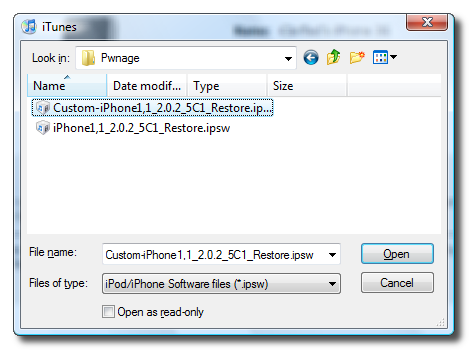
A popup window will appear asking you to select your firmware. Select the Custom firmware file we created using WinPwn from the Pwnage folder on your Desktop then click the Open button.


Your iPhone will now be restored unlocked to the jailbroken 2.0.x firmware of your choice!


Iphone: How to Jailbreak Your 2.0.x 3G iPhone (Windows) [WinPwn 2.5]

Iphone: How to Jailbreak Your 2.0.x 3G iPhone (Windows) [WinPwn 2.5]

Iphone: Games

Iphone Games And Applications

Mr. Trivia

mr.-trivia Format: IPA
Version: 2.0
Company: Iron Square
Category: Games
Price: $1.99


iChillout

ichillout Format: IPA
Version: 1.1
Company: Chillingo Ltd
Category: Productivity
Price: $0.99

Trism

trism Format: IPA
Version: 1.1
Company: Demiforce LLC
Category: Games
Price: $4.99

Labyrinth

labyrinth Format: IPA
Version: 1.3
Company: Codify AB
Category: Games
Price: $6.99

iWallpaper

iwallpaper Format: IPA
Version: 1.2
Company: Smartphones Technologies, Inc.
Category: Entertainment
Price: $3.99

Exposure Premium

exposure-premium Format: IPA
Version: 1.0.2
Company: Connected Flow
Category: Photography
Price: $9.99

CityTransit NYC Subway Guide

citytransit-nyc-subway-guide Format: IPA
Version: 1.02
Company: Magnetism Studios
Category: Navigation
Price: $2.99

iRelax - Electronica

irelax---electronica Format: IPA
Version: 1.0
Company: Chillingo Ltd
Category: Productivity
Price: $0.99

iRelax - Ambient

irelax---ambient Format: IPA
Version: 1.0
Company: Chillingo Ltd
Category: Productivity
Price: $0.99

Critter Crunch

critter-crunch Format: IPA
Version: 1.0.5
Company: Publisher X
Category: Games
Price: $7.99

Shards

shards Format: IPA
Version: 1.1.0
Company: CouchWorld Games
Category: Games
Price: $5.99


PicVault

picvault Format: IPA
Version: 2.0
Company: JOHN MOFFETT
Category: Photography
Price: $2.99

Pingamajig

pingamajig Format: IPA
Version: 1.0
Company: PingySoft
Category: Utilities
Price: $0.99

ABGroups

abgroups Format: IPA
Version: 1.4
Company: Andrea Vettori
Category: Business
Price: $0.99

PatternManiak

patternmaniak:-a-puzzlemaniak-game Format: IPA
Version: 1.1
Company: Alexandre Minard
Category: Games
Price: $0.99

Stage Hand

stage-hand Format: IPA
Version: 1.4
Company: Wooji Juice
Category: Business
Price: $7.99

Mote-M

mote-m Format: IPA
Version: 1.1
Company: gxjones
Category: Games
Price: $0.99

Hearts

hearts Format: IPA
Version: 1.0
Company: Owen Shaw
Category: Games
Price: $4.99

Autonomous

autonomous Format: IPA
Version: 1.1.0
Company: Pixio
Category: Games
Price: $1.99


LifeTimer

lifetimer Format: IPA
Version: 1.1
Company: David Leblond
Category: Utilities
Price: $0.99

MinesManiak

minesmaniak:-a-puzzlemaniak-game Format: IPA
Version: 1.1
Company: Alexandre Minard
Category: Games
Price: $0.99

G-FORCE

g-force Format: IPA
Version: 1.1
Company: Y Lau
Category: Sports
Price: $2.99

WinAdmin

winadmin Format: IPA
Version: 1.1.0
Company: Carter Harrison, LLC
Category: Utilities
Price: $11.99

Developers Tool Kit

developers-tool-kit Format: IPA
Version: 1.0
Company: Swamiware LLC
Category: Reference
Price: $4.99


iRelax - Ambient

irelax---ambient Format: IPA
Version: 1.0
Company: Chillingo Ltd
Category: Productivity
Price: $0.99


Critter Crunch

critter-crunch Format: IPA
Version: 1.0.5
Company: Publisher X
Category: Games
Price: $7.99


Shards

shards Format: IPA
Version: 1.1.0
Company: CouchWorld Games
Category: Games
Price: $5.99


Crazy Metal Head

crazy-metal-head Format: IPA
Version: 1.0
Company: Ezone.com
Category: Entertainment
Price: $0.99


Autonomous

autonomous Format: IPA
Version: 1.1.0
Company: Pixio
Category: Games
Price: $1.99


Hearts

hearts Format: IPA
Version: 1.0
Company: Owen Shaw
Category: Games
Price: $4.99


Mote-M

mote-m Format: IPA
Version: 1.1
Company: gxjones
Category: Games
Price: $0.99


Jaadu VNC

jaadu-vnc Format: IPA
Version: 1.2
Company: Jugaari
Category: Business
Price: $24.99


Countdown

countdown Format: IPA
Version: 1.1
Company: IAM Web Services
Category: Utilities
Price: $0.99


Asphalt 4 Elite Racing

asphalt-4-elite-racing Format: IPA
Version: 1.2.0
Company: gameloft (iDP)
Category: Games
Price: $9.99


Endless Walls

endless-walls Format: IPA
Version: 1.0.4
Company: Motacore, LLC
Category: Entertainment
Price: $1.99


iVoodoo

ivoodoo Format: IPA
Version: 1.01
Company: oeFun, Inc.
Category: Entertainment
Price: $2.99


Jerk In A Box

jerk-in-a-box Format: IPA
Version: 1.0.0
Company: E.E. Flobes
Category: Entertainment
Price: $0.99

 
 iPhone © 2012 | Designed by LogosDatabase.com, in collaboration with Credit Card Machines, Corporate Headquarters and Motivational Quotes